If you have updated a page and want Google to revisit it, you can request indexing through Google Search Console. The same tool can also be used for a new page.
Submitting a request does not make the page appear immediately or guarantee that Google will index it. Google says crawling can take a few days to a few weeks. In this guide, I’ll explain the steps, what to expect afterwards and what to check if the changes are not showing.
How to Request Reindexing on Google
1. Open the Correct Search Console Property
Sign in to Google Search Console and select the property for your website. You need to be an owner or full user to request indexing.
If your website is not set up yet, add and verify it first. Search Console helps you check whether Google has discovered, crawled and indexed your pages.
2. Inspect the Full Page URL
Copy the full address of the page you have changed. Paste it into the URL inspection bar at the top of Search Console and press Enter.
Use the page’s own URL, rather than your homepage address, unless the homepage is the page you want Google to revisit.

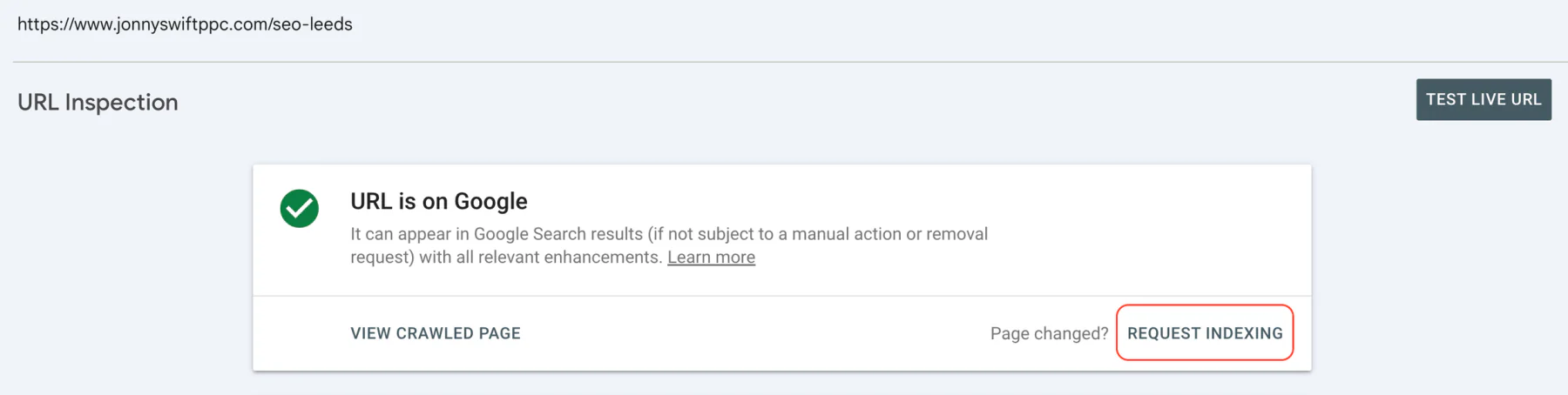
3. Review the Result and Request Indexing
Read the inspection result. It describes what Google knows about the indexed version, which may differ from the page currently on your website.
If you have just fixed a problem, you can use Test live URL to check the current page. A successful live test does not guarantee indexing.
Select Request indexing. Search Console checks whether the live URL can be indexed and, if the request succeeds, adds it to a crawl queue.
How Long Does Google Take to Reindex a Page?
There is no fixed deadline. Google’s guidance says crawling can take a few days to a few weeks, and requesting a crawl does not guarantee immediate inclusion in search results, or inclusion at all.
Google revisiting your page, processing its updated content and showing that update in search results are separate stages. A submitted request is not confirmation that all of them have happened.
I recommend recording when you updated the page and checking progress in Search Console, rather than assuming something is wrong if the search result has not changed the next day.
How Can You Check Whether Google Has Recrawled the Page?
Inspect the URL again later and review the last crawl date under the indexing information. A crawl date after your update shows that Google has revisited the page; it does not prove that every change has been reflected in search results.
Also review its indexing status and Google-selected canonical URL. If Google has selected another page as canonical, investigate why before repeatedly submitting the same URL.
Are There Limits on Indexing Requests?
Google applies a quota to individual requests, but its guidance does not promise a fixed allowance of 10 or 15 URLs per day. If you reach your available quota, wait before submitting more requests.
Requesting a crawl repeatedly for the same page will not make it happen faster. For larger numbers of URLs, use a sitemap to help Google discover them.
What If Your Updated Page Still Is Not Showing?
Check the inspection result for a specific problem. Useful checks include:
- The page opens without a login and returns a successful response.
- Googlebot is not blocked by robots.txt.
- The page does not have an unintended noindex instruction.
- The canonical URL points to the page you intend Google to index.
- Relevant pages on your website link to it.
Fix the underlying issue before requesting indexing again. If you have just launched an entire website, my guide to how long Google takes to crawl a new website covers sitemap submission and what early search visibility can look like.
For an updated article, it is also worth checking whether the content needs more work. My guide to updating old blog posts or writing new ones explains how I make that decision.
What Should You Do After Submitting the Request?
Give Google time to revisit and process the page. Monitor its crawl and indexing information, then review relevant impressions and clicks over time. Reindexing is not a guarantee of higher rankings.
If you need help investigating indexing problems, take a look at Swift & Co’s SEO services or get in touch to discuss your website.