Writing and updating blog content can be a great way to grow your website. But where should you put your time?
You might have a new topic you want to target. Or you might already have blog posts that aren’t getting much traffic from Google, despite covering questions your customers are asking.
My recommendation is to check what you already have first. If an existing article targets the same question, I would normally improve that page. If you’ve found a relevant question your website doesn’t answer, that’s a good opportunity for a new post.
In this blog post, I’ll explain how I decide between the two and what I recommend checking before making changes.
Start With Keyword Research and Your Existing Content
Before writing a blog post, I recommend doing some keyword research.
I use Ahrefs for this. Normally, I start by looking through my website to see which topics I’ve already covered and whether there’s a relevant question I haven’t targeted yet.
Then I search a few options in Ahrefs and look at question keywords. These give you a useful starting point because they show the sort of questions people search for.
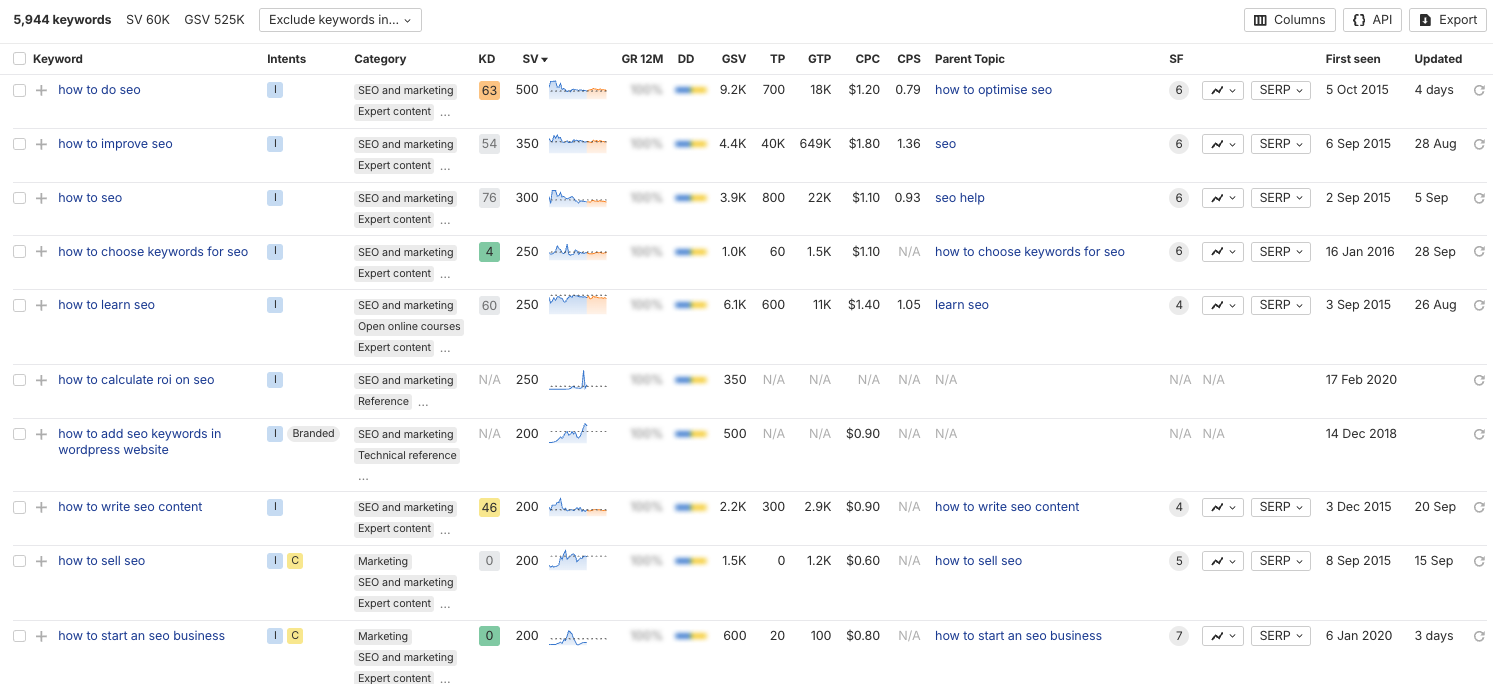
For example, “how to choose keywords for SEO” and “how to write SEO content” could need different articles because they answer different questions.
But two slightly different ways of asking the same question don’t necessarily need separate posts. “Should I update old blog posts?” and “Is updating old blog content worth it?” could comfortably belong in one article.
My general recommendation is to have one main blog post answering each distinct question. You don’t need a separate page for every keyword variation.
When Should You Update an Old Blog Post?
If you already have an article answering the question you want to target, I would normally update it before creating another page.
To find potential opportunities, I recommend looking at Google Search Console.
Look for pages receiving plenty of impressions but very few clicks. Impressions tell you that your page is appearing in search results; clicks tell you how often someone visits it from those results.
Here’s an example from my separate Jonny Swift PPC website:
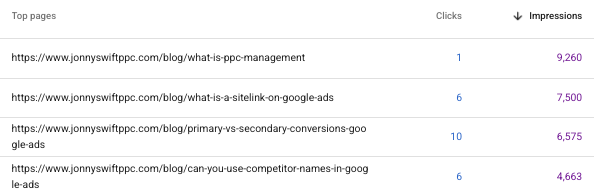
That makes them worth investigating. However, impressions alone don’t tell you that a page is ranking well, and low clicks don’t automatically mean the content needs rewriting.
Check which queries the page appears for, its average position and whether its title accurately explains what the reader will get.
The page might be appearing too far down the results. It could be showing for searches that aren’t a particularly good fit. Or the title might not make the answer clear enough.
Once you’ve checked those things, read the article itself. Does it answer the question properly? Is anything outdated? Are there useful explanations missing?
If there’s a clear opportunity to improve it, that’s where I would focus.
What Should You Change in an Existing Article?
You don’t have to completely rewrite a blog post to make it more useful.
Start with the parts that need attention.
Check the Page Title and H1
Your page title and main heading should make the subject clear and match what the article actually answers.
If they’re vague or don’t reflect the question you’re targeting, I would consider improving them.
That doesn’t mean forcing the keyword into every heading. Use natural wording that helps someone understand the page.
Compare the Article With Relevant Search Results
I recommend looking at the pages ranking around positions one to three for your target search term.
Check what they explain and compare that with your own article:
- Do they answer an important follow-up question you’ve missed?
- Do they explain a step more clearly?
- Do they include an example or screenshot that makes the advice easier to follow?
- Is your article still answering the same need as the current results?
Use that comparison to identify useful gaps. You don’t need to copy their wording or add every section they have.
The aim is to give your reader a complete, clear answer.
Improve the Structure and Relevant Details
Sometimes the information is already there, but it’s difficult to find.
You might need clearer headings, a more direct answer near the start, or a better order for the steps. Other articles may need updated screenshots, corrected information or links to relevant guides.
Keep the useful parts and improve what’s missing. Adding more words on its own isn’t the objective.
When Should You Write a New Blog Post?
Write a new article when you’ve found a relevant question that your existing content doesn’t properly cover.
The important thing is whether it needs a distinct answer.
If it’s a small follow-up question, an extra section in an existing article may be enough. If it serves a different reader need and deserves a full explanation, a separate post makes more sense.
For example, a guide to finding blog topics and a guide to deciding whether to update existing posts are related, but they help the reader make different decisions.
What I would avoid is publishing another article answering essentially the same question just because the first one isn’t performing well.
Overlapping pages aren’t automatically a Google penalty. But they can create unnecessary duplication and make it harder to maintain one clear, useful answer on your website.
When Would I Leave a Blog Post Alone?
If an article is already ranking around positions one to five for its intended searches, answering the question well and bringing in useful traffic, I wouldn’t make major changes just for the sake of updating it.
An old publication date isn’t, by itself, a reason to rewrite something.
You should still correct inaccurate information or replace an outdated screenshot. But if the content remains useful and performs well, your time may be better spent improving a weaker article or covering a new topic.
Request Indexing After an Update
After making a meaningful update, I recommend requesting indexing through Google Search Console.
You can follow my guide on how to request reindexing on Google.
This asks Google to revisit the page. It doesn’t guarantee immediate indexing or higher rankings, and changes can take time to have an effect.
Record when you updated the article, then review its relevant queries, impressions and clicks over time. Give it enough time to assess the result rather than judging the update the following day.
Where Should You Focus First?
Check whether you already have a page answering the question.
If you do, and there’s a clear way to improve it, update that article. If you don’t, and the topic is relevant to your business, write a new one.
You don’t need to keep publishing more pages to make progress. Sometimes the best next step is making better use of the content you already have.
If you need help deciding which content deserves attention, take a look at Swift & Co’s SEO services. We can help you plan where to focus your content work.